> ## Documentation Index
> Fetch the complete documentation index at: https://docs.primev.xyz/llms.txt
> Use this file to discover all available pages before exploring further.
# Symbiotic Opt-in
> Opt into mev-commit by ERC20 restaking with the MevCommitMiddleware contract through Symbiotic.
# Context
### Why use this method?
Opting-in through Symbiotic is ideal for validators that wish to be secured by ERC20 collateral residing from a Symbiotic vault.
Symbiotic is capital efficient in that vault collateral can be restaked towards other protocols. Further, Symbiotic offers a large degree of restaking configurability.
### Prerequisites
Prior to opt-in through Symbiotic, it's worth familiarizing yourself with their [documentation](https://docs.symbiotic.fi/) on Networks, Vaults, and Operators. This method of validator opt-in requires competency in vault and operator curation.
### Who is this for?
Mev-commit is flexible in the type of entities that use Symbiotic to restake, and secure validators with our protocol. Any combination of Operator and Vault entities can be used, whether each are from the same organization or not.
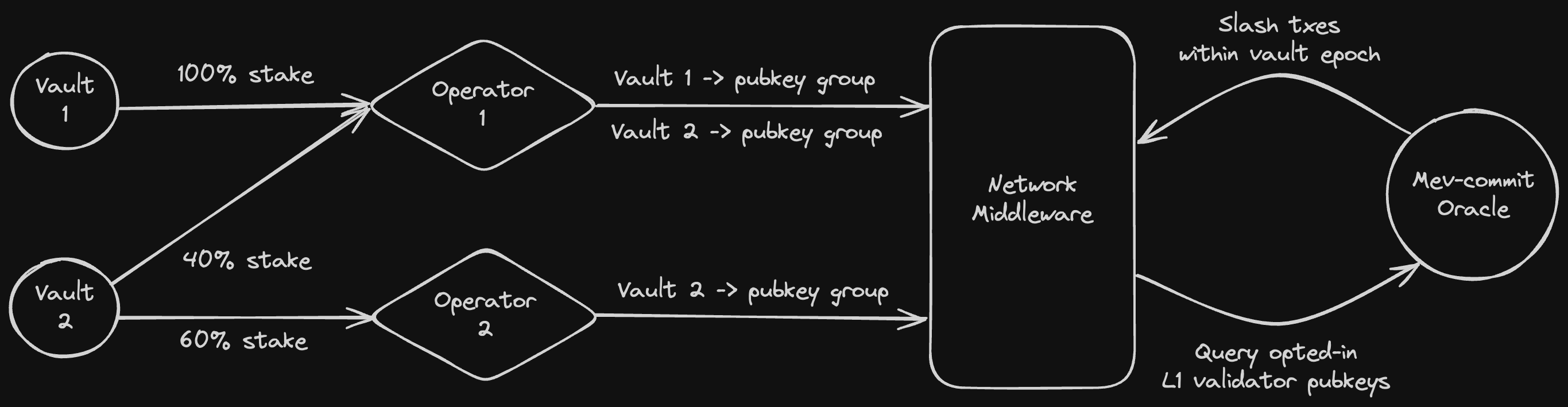
Most importantly, For L1 validators to be opted-in to mev-commit, a minimum of 3 ETH worth of restake must be slashable for each validator, in case that validator acts against its protocol commitments. This can be reduced for operators with a large number of validators to 1,000 ETH at the entity level. Vaults allocate slashable ERC20 collateral to Operators that are registered with the mev-commit network in Symbiotic. This collateral may be slashable by other Symbiotic networks, hence it is restaked.
Operators for the mev-commit network are responsible for bulk registering groups of L1 validator pubkeys to an associated vault. Every registered validator is represented by restaked collateral from a single Vault and Operator. Each Vault’s total collateral can be split up to secure/represent many validators in groups.
 ### Rewards
The primary reward that a validator earns in opting-in to mev-commit is increased yield, generated by providers being able to place higher bids in the mev-boost auction. See [Why Participate](/v1.2.x/get-started/validators/validator-guide#why-participate?) for more details.
All vault/operator pairs must agree on how validator yield will be split or otherwise distributed.
We plan to introduce a points system that will be applied to all opted-in validators. In the context of using Symbiotic, each vault will earn points commensurate to the number of validators opted-in through that vault.
### Network Overview
The Symbiotic "network" in this context is mev-commit. Our network is represented by:
* A "network address", aka the Primev team multisig at [0x9101eda106A443A0fA82375936D0D1680D5a64F5](https://etherscan.io/address/0x9101eda106A443A0fA82375936D0D1680D5a64F5)
* A "middleware contract" at [0x21fD239311B050bbeE7F32850d99ADc224761382](https://etherscan.io/address/0x21fD239311B050bbeE7F32850d99ADc224761382)
# Setup
The following setup steps will reference various Symbiotic core contracts. Refer to their [deployments page](https://docs.symbiotic.fi/category/deployments) and [core source code](https://github.com/symbioticfi/core).
For technical users who're comfortable running foundry scripts, we've provided example code for every step in the setup process [here](https://github.com/primev/mev-commit/blob/main/contracts/scripts/validator-registry/middleware/ExampleSetup.s.sol).
Alternatively the Symbiotic CLI can assist in many of these steps. Refer to their [docs](https://docs.symbiotic.fi/guides/cli/).
A vault contract must be deployed and configured with slashable ERC20 `collateral`. Mev-commit will accept most forms of ERC20 collateral, unless they present significant risk of losing value. For non ETH denominated assets, overcollateralization may be required compared to their ETH denominated counterparts.
See Symbiotic's [vault deployment guide](https://docs.symbiotic.fi/guides/vault-deployment/) and [vault configuration docs](https://docs.symbiotic.fi/handbooks/vaults-handbook#vault-configuration).
We enforce that all of the `Vault`, `Delegator`, `Slasher`, and `BurnerRouter` contracts are deployed via their relevant "factory" contract. Using Symbiotic's `VaultConfigurator` achieves this, and is recommended. Factory and vault configurator addresses can be found from the Symbiotic [deployments page](https://docs.symbiotic.fi/category/deployments).
Mev-commit enforces vault configuration from the following dropdowns:
The `IVaultStorage.burner` address must be set to a `BurnerRouter` contract, and this contract must be deployed via Symbiotic's `IBurnerRouterFactory.create()`. Find more details about burner routers [here](https://docs.symbiotic.fi/modules/extensions/burners#burner-router).
If you're deploying a burner router for the first time, please set all necessary parameters upon contract initialization. This avoids unnecessary delays in the setup process. If your burner router is already deployed, the `delay` must elapse before `acceptNetworkReceiver` can be called, to properly set the network receiver.
The deployed burner router must be configured as follows:
* `IBurnerRouter.networkReceiver()` must be set to `0xD5881f91270550B8850127f05BD6C8C203B3D33f`.
* `IBurnerRouter.operatorNetworkReceiver()` must be disable by setting to `address(0)`, or set to `0xD5881f91270550B8850127f05BD6C8C203B3D33f`. Essentially this value must not override a valid network receiver.
* `IBurnerRouter.delay()` must be greater than `2 days`.
Upon vault registration, and validator registration, all burner router configuration is validated on-chain. If later on this validation fails, all validators associated to a vault will no longer be opted-in, as enforced in `_isValidatorOptedIn`.
The delegator module for the vault must be the `NetworkRestakeDelegator` or `OperatorSpecificDelegator` type. `FullRestakeDelegator` is not supported.
If using an `OperatorSpecificDelegator`, ensure the `IOperatorSpecificDelegator.operator()` field is initialized to the operator address that'll be used in subsequent steps. The operator field is immutable after delegator deployment!
The slasher module must be set, and can be either a `Slasher` or `VetoSlasher` type.
Vaults with an instant `Slasher` must have an `epochDuration` greater than `1 day` to register with our middleware contract.
Vaults with veto slashers:
* must have an `epochDuration` greater than `1 day + vetoDuration`, where `vetoDuration` is specified by the slasher.
* require the resolver to be disabled via `address(0)`, since a permissioned oracle account invokes slashing, requiring only the most basic slashing interface.
`IBaseSlasher.BaseParams` must have `isBurnerHook` set to `true`.
Considering these requirements, below is an example of how to deploy a vault with a burner router, delegator, and slasher, using a foundry script.
```solidity theme={null}
contract SetupVault is Script {
function run() external {
vm.startBroadcast();
// Deploy burner router
address burnerRouterFactory = 0x42dD40dC2130c658AB32d9989FF8aBe6c36463c0;
IBurnerRouter.NetworkReceiver[] memory networkReceivers = new IBurnerRouter.NetworkReceiver[](1);
networkReceivers[0] = IBurnerRouter.NetworkReceiver({
network: 0x9101eda106A443A0fA82375936D0D1680D5a64F5,
receiver: 0xD5881f91270550B8850127f05BD6C8C203B3D33f
});
address burnerRouter = IBurnerRouterFactory(burnerRouterFactory).create(
IBurnerRouter.InitParams({
owner: msg.sender,
collateral: 0xae7ab96520DE3A18E5e111B5EaAb095312D7fE84, // stETH
delay: 3 days, // > 2 days
globalReceiver: msg.sender,
networkReceivers: networkReceivers,
operatorNetworkReceivers: new IBurnerRouter.OperatorNetworkReceiver[](0) // Empty or same as networkReceivers
}));
console.log("Burner router deployed to:", address(burnerRouter));
// Deploy vault with delegator and slasher
IVaultConfigurator vaultConfigurator = IVaultConfigurator(0x29300b1d3150B4E2b12fE80BE72f365E200441EC);
address[] memory networkLimitSetRoleHolders = new address[](1);
networkLimitSetRoleHolders[0] = msg.sender;
address[] memory operatorNetworkSharesSetRoleHolders = new address[](1);
operatorNetworkSharesSetRoleHolders[0] = msg.sender;
IVaultConfigurator.InitParams memory initParams = IVaultConfigurator.InitParams({
version: 1,
owner: msg.sender,
vaultParams: abi.encode(IVault.InitParams({
collateral: 0xae7ab96520DE3A18E5e111B5EaAb095312D7fE84, // stETH
burner: address(burnerRouter),
epochDuration: 1 weeks,
depositWhitelist: false,
isDepositLimit: false,
depositLimit: 0,
defaultAdminRoleHolder: msg.sender,
depositWhitelistSetRoleHolder: msg.sender,
depositorWhitelistRoleHolder: msg.sender,
isDepositLimitSetRoleHolder: msg.sender,
depositLimitSetRoleHolder: msg.sender
})),
delegatorIndex: 2, // OperatorSpecificDelegator
delegatorParams: abi.encode(IOperatorSpecificDelegator.InitParams({
baseParams: IBaseDelegator.BaseParams({
defaultAdminRoleHolder: msg.sender,
hook: 0x0000000000000000000000000000000000000000,
hookSetRoleHolder: msg.sender
}),
networkLimitSetRoleHolders: networkLimitSetRoleHolders,
operator: 0xb4F13624966E874967d7C9231F2F740F03F1A832
})),
withSlasher: true,
slasherIndex: 0, // Instant slasher
slasherParams: abi.encode(ISlasher.InitParams({
baseParams: IBaseSlasher.BaseParams({
isBurnerHook: true // Required
})
}))
});
```
To run the script, use a command similar to
```bash theme={null}
forge script scripts/validator-registry/middleware/ExampleSetup.s.sol:SetupVault \
--via-ir \
--rpc-url $RPC_URL \
--keystore $KEYSTORE \
--password $PASSWORD \
--broadcast
```
After the vault, burner router, delegator, and slasher are deployed in the previous step, the vault must obtain deposits of the appropriate ERC20 collateral type. These deposits can come from a variety of sources depending on the vault.
Here is an example of how an account would deposit to a vault using a foundry script.
```solidity theme={null}
contract DepositToVault is Script {
function run() external {
vm.startBroadcast();
address stEthVault = 0x5DF518571733d5F4f496D76C9087110FAe98a946;
address stEthToken = 0xae7ab96520DE3A18E5e111B5EaAb095312D7fE84;
IERC20(stEthToken).approve(stEthVault, 0.1 ether);
IVault vault = IVault(stEthVault);
vault.deposit(msg.sender, 0.1 ether);
vm.stopBroadcast();
}
}
```
To run the script, use a command similar to
```bash theme={null}
forge script scripts/validator-registry/middleware/ExampleSetup.s.sol:DepositToVault \
--via-ir \
--rpc-url $RPC_URL \
--keystore $KEYSTORE \
--password $PASSWORD \
--broadcast
```
Next, a Symbiotic operator can be setup as an EOA or a contract. The Operator must be registered with Symbiotic via `OperatorRegistry.registerOperator()`.
The operator must then opt-in to any vault which will secure validators via `VaultOptInService.optIn(vaultAddress)`.
The operator then opts-in to the mev-commit network via `NetworkOptInService.optIn(networkAddress)`. The network address is `0x9101eda106A443A0fA82375936D0D1680D5a64F5` for mainnet. An operator only needs to opt-in to the mev-commit network once even if an operator represents multiple vaults.
Here is an example of the operator actions required in this step, using a foundry script.
```solidity theme={null}
contract OperatorActions is Script {
function run() external {
vm.startBroadcast();
IOperatorRegistry operatorRegistry = IOperatorRegistry(0xAd817a6Bc954F678451A71363f04150FDD81Af9F);
operatorRegistry.registerOperator();
IOptInService vaultOptInService = IOptInService(0xb361894bC06cbBA7Ea8098BF0e32EB1906A5F891);
address stEthVault = 0x5DF518571733d5F4f496D76C9087110FAe98a946;
vaultOptInService.optIn(stEthVault);
IOptInService networkOptInService = IOptInService(0x7133415b33B438843D581013f98A08704316633c);
networkOptInService.optIn(0x9101eda106A443A0fA82375936D0D1680D5a64F5);
vm.stopBroadcast();
}
}
```
To run the script, use a command similar to
```bash theme={null}
forge script scripts/validator-registry/middleware/ExampleSetup.s.sol:OperatorActions \
--via-ir \
--rpc-url $RPC_URL \
--keystore $KEYSTORE \
--password $PASSWORD \
--broadcast
```
At this point you've setup a vault and operator pair that can be used to opt-in a group of validator pubkeys. Next you'll need communicate the following details to our team:
* The vault address and operator address setup in previous steps.
* The type of ERC20 collateral that will be used to secure the validator pubkeys.
* The decimal precision of the ERC20 collateral (not all ERC20s have 18 decimal precision).
* The max amount of collateral your vault plans to allocate toward securing the mev-commit network. This value should be equal to or less than the total collateral in the vault.
Hey Primev team, here are the required details for step 4 of the Symbiotic opt-in process.
* Vault Address: `0xa0Fc5e70aad58028020A13ACd2e5B1f2431C912f`
* Operator Address: `0x7c096554FCb894DE83aEf8e5F31CC6B04cD9570d`
* Collateral Type: `stETH`, contract address: `0xae7ab96520DE3A18E5e111B5EaAb095312D7fE84`
* Collateral Precision: `18`
* Amount of collateral available to allocate: `1000000.0 stETH`
Please provide these values to our team in the exact format described, and let us know if you have any questions.
From here our team will assign a `slashAmount` appropriate for the collateral type. `slashAmount` of collateral is required to define a single validator as being slashable, and therefore opted-in to mev-commit. The vault/operator pair is able to opt-in `totalCollateral / slashAmount` number of validators.
The network address (represented by Primev) will then set a max network limit for the vault's delegator module, `IBaseDelegator.setMaxNetworkLimit(uint96 identifier, uint256 amount)`. This is the maximum amount of collateral that will be accepted by the network from the vault.
The network address will also call:
* `MevCommitMiddleware.registerOperators` to register the operator with the middleware contract.
* `MevCommitMiddleware.registerVaults` to register the vault with the middleware contract, associated to a `slashAmount`.
Finally the vault curator address must make some calls. `setNetworkLimit(bytes32 subnetwork, uint256 amount)` should be called on the delegator module of the vault. This sets the total amount of collateral the vault would like to restake to the mev-commit network.
For mev-commit, the subnetwork id is always `1`, and the `subnetwork` argument can be computed using Symbiotic's [Subnetwork library](https://github.com/symbioticfi/core/blob/main/src/contracts/libraries/Subnetwork.sol), by concatenating the network address with the subnetwork ID. For mainnet the subnetwork bytes32 value is `0x9101eda106a443a0fa82375936d0d1680d5a64f5000000000000000000000001`.
If using a `NetworkRestakeDelegator`, the vault curator must then call `INetworkRestakeDelegator.setOperatorNetworkShares(bytes32 subnetwork, address operator, uint256 shares)`. This sets what portion of the mev-commit allocated stake the vault curator is allocating to a particular operator.
If using an `OperatorSpecificDelegator`, calling `setOperatorNetworkShares` is not required, as this type of delegator automatically allocates 100% of the "shares" to a single operator.
Here is an example of how the vault curator would complete this step, using a foundry script.
```solidity theme={null}
contract VaultActions is Script {
function run() external {
vm.startBroadcast();
IOperatorSpecificDelegator delegator = IOperatorSpecificDelegator(0x75b131De299A5D343b9408081DD6A8D6a9891b8c);
delegator.setNetworkLimit(0x9101eda106a443a0fa82375936d0d1680d5a64f5000000000000000000000001, 1000000 ether);
uint256 stake = delegator.stake(0x9101eda106a443a0fa82375936d0d1680d5a64f5000000000000000000000001, msg.sender);
console.log("Stake toward operator:", stake);
vm.stopBroadcast();
}
}
```
To run the script, use a command similar to
```bash theme={null}
forge script scripts/validator-registry/middleware/ExampleSetup.s.sol:VaultActions \
--via-ir \
--rpc-url $RPC_URL \
--keystore $KEYSTORE \
--password $PASSWORD \
--broadcast
```
Now that setup is complete, the operator can register validators to the vault, so long as enough slashable collateral is allocated to the operator from previous steps.
This is done through the [mainnet validator dashboard](https://validators.mev-commit.xyz/).
Validator deregistration is also done through this dashboard, and requires waiting a deregistration period.
# Hoodi Testnet
Users can test Symbiotic flow using our Hoodi Vault (no stake necessary) by completing step 3 of the setup process above using our Hoodi Vault and Hoodi Network address, then contacting our team for registration within the Hoodi MevCommitMiddleware contract.
Alternatively, users can follow the full setup steps to test using their own Hoodi Vaults.
**Note:** Mentioned mainnet addresses in the setup guide **must be substituted with corresponding testnet addresses** [**found here**](https://docs.primev.xyz/v1.2.x/developers/networks/testnet#other-addresses-hoodi) and [**Symbiotic's Hoodi addresses, found here.**](https://docs.symbiotic.fi/deployments/testnet/#core-2)
# How to Maintain Validators Stay Opted-In
It's an operator's responsibility to monitor vault collateral, and make sure all registered validators are also slashable. This means if vault collateral is reduced to a value that does not define all validators as slashable (considering `slashAmount`), the operator must deregister validators of its choice, or implicitly accept that some quasi-random validators will no longer be "opted-in".
### Rewards
The primary reward that a validator earns in opting-in to mev-commit is increased yield, generated by providers being able to place higher bids in the mev-boost auction. See [Why Participate](/v1.2.x/get-started/validators/validator-guide#why-participate?) for more details.
All vault/operator pairs must agree on how validator yield will be split or otherwise distributed.
We plan to introduce a points system that will be applied to all opted-in validators. In the context of using Symbiotic, each vault will earn points commensurate to the number of validators opted-in through that vault.
### Network Overview
The Symbiotic "network" in this context is mev-commit. Our network is represented by:
* A "network address", aka the Primev team multisig at [0x9101eda106A443A0fA82375936D0D1680D5a64F5](https://etherscan.io/address/0x9101eda106A443A0fA82375936D0D1680D5a64F5)
* A "middleware contract" at [0x21fD239311B050bbeE7F32850d99ADc224761382](https://etherscan.io/address/0x21fD239311B050bbeE7F32850d99ADc224761382)
# Setup
The following setup steps will reference various Symbiotic core contracts. Refer to their [deployments page](https://docs.symbiotic.fi/category/deployments) and [core source code](https://github.com/symbioticfi/core).
For technical users who're comfortable running foundry scripts, we've provided example code for every step in the setup process [here](https://github.com/primev/mev-commit/blob/main/contracts/scripts/validator-registry/middleware/ExampleSetup.s.sol).
Alternatively the Symbiotic CLI can assist in many of these steps. Refer to their [docs](https://docs.symbiotic.fi/guides/cli/).
A vault contract must be deployed and configured with slashable ERC20 `collateral`. Mev-commit will accept most forms of ERC20 collateral, unless they present significant risk of losing value. For non ETH denominated assets, overcollateralization may be required compared to their ETH denominated counterparts.
See Symbiotic's [vault deployment guide](https://docs.symbiotic.fi/guides/vault-deployment/) and [vault configuration docs](https://docs.symbiotic.fi/handbooks/vaults-handbook#vault-configuration).
We enforce that all of the `Vault`, `Delegator`, `Slasher`, and `BurnerRouter` contracts are deployed via their relevant "factory" contract. Using Symbiotic's `VaultConfigurator` achieves this, and is recommended. Factory and vault configurator addresses can be found from the Symbiotic [deployments page](https://docs.symbiotic.fi/category/deployments).
Mev-commit enforces vault configuration from the following dropdowns:
The `IVaultStorage.burner` address must be set to a `BurnerRouter` contract, and this contract must be deployed via Symbiotic's `IBurnerRouterFactory.create()`. Find more details about burner routers [here](https://docs.symbiotic.fi/modules/extensions/burners#burner-router).
If you're deploying a burner router for the first time, please set all necessary parameters upon contract initialization. This avoids unnecessary delays in the setup process. If your burner router is already deployed, the `delay` must elapse before `acceptNetworkReceiver` can be called, to properly set the network receiver.
The deployed burner router must be configured as follows:
* `IBurnerRouter.networkReceiver()` must be set to `0xD5881f91270550B8850127f05BD6C8C203B3D33f`.
* `IBurnerRouter.operatorNetworkReceiver()` must be disable by setting to `address(0)`, or set to `0xD5881f91270550B8850127f05BD6C8C203B3D33f`. Essentially this value must not override a valid network receiver.
* `IBurnerRouter.delay()` must be greater than `2 days`.
Upon vault registration, and validator registration, all burner router configuration is validated on-chain. If later on this validation fails, all validators associated to a vault will no longer be opted-in, as enforced in `_isValidatorOptedIn`.
The delegator module for the vault must be the `NetworkRestakeDelegator` or `OperatorSpecificDelegator` type. `FullRestakeDelegator` is not supported.
If using an `OperatorSpecificDelegator`, ensure the `IOperatorSpecificDelegator.operator()` field is initialized to the operator address that'll be used in subsequent steps. The operator field is immutable after delegator deployment!
The slasher module must be set, and can be either a `Slasher` or `VetoSlasher` type.
Vaults with an instant `Slasher` must have an `epochDuration` greater than `1 day` to register with our middleware contract.
Vaults with veto slashers:
* must have an `epochDuration` greater than `1 day + vetoDuration`, where `vetoDuration` is specified by the slasher.
* require the resolver to be disabled via `address(0)`, since a permissioned oracle account invokes slashing, requiring only the most basic slashing interface.
`IBaseSlasher.BaseParams` must have `isBurnerHook` set to `true`.
Considering these requirements, below is an example of how to deploy a vault with a burner router, delegator, and slasher, using a foundry script.
```solidity theme={null}
contract SetupVault is Script {
function run() external {
vm.startBroadcast();
// Deploy burner router
address burnerRouterFactory = 0x42dD40dC2130c658AB32d9989FF8aBe6c36463c0;
IBurnerRouter.NetworkReceiver[] memory networkReceivers = new IBurnerRouter.NetworkReceiver[](1);
networkReceivers[0] = IBurnerRouter.NetworkReceiver({
network: 0x9101eda106A443A0fA82375936D0D1680D5a64F5,
receiver: 0xD5881f91270550B8850127f05BD6C8C203B3D33f
});
address burnerRouter = IBurnerRouterFactory(burnerRouterFactory).create(
IBurnerRouter.InitParams({
owner: msg.sender,
collateral: 0xae7ab96520DE3A18E5e111B5EaAb095312D7fE84, // stETH
delay: 3 days, // > 2 days
globalReceiver: msg.sender,
networkReceivers: networkReceivers,
operatorNetworkReceivers: new IBurnerRouter.OperatorNetworkReceiver[](0) // Empty or same as networkReceivers
}));
console.log("Burner router deployed to:", address(burnerRouter));
// Deploy vault with delegator and slasher
IVaultConfigurator vaultConfigurator = IVaultConfigurator(0x29300b1d3150B4E2b12fE80BE72f365E200441EC);
address[] memory networkLimitSetRoleHolders = new address[](1);
networkLimitSetRoleHolders[0] = msg.sender;
address[] memory operatorNetworkSharesSetRoleHolders = new address[](1);
operatorNetworkSharesSetRoleHolders[0] = msg.sender;
IVaultConfigurator.InitParams memory initParams = IVaultConfigurator.InitParams({
version: 1,
owner: msg.sender,
vaultParams: abi.encode(IVault.InitParams({
collateral: 0xae7ab96520DE3A18E5e111B5EaAb095312D7fE84, // stETH
burner: address(burnerRouter),
epochDuration: 1 weeks,
depositWhitelist: false,
isDepositLimit: false,
depositLimit: 0,
defaultAdminRoleHolder: msg.sender,
depositWhitelistSetRoleHolder: msg.sender,
depositorWhitelistRoleHolder: msg.sender,
isDepositLimitSetRoleHolder: msg.sender,
depositLimitSetRoleHolder: msg.sender
})),
delegatorIndex: 2, // OperatorSpecificDelegator
delegatorParams: abi.encode(IOperatorSpecificDelegator.InitParams({
baseParams: IBaseDelegator.BaseParams({
defaultAdminRoleHolder: msg.sender,
hook: 0x0000000000000000000000000000000000000000,
hookSetRoleHolder: msg.sender
}),
networkLimitSetRoleHolders: networkLimitSetRoleHolders,
operator: 0xb4F13624966E874967d7C9231F2F740F03F1A832
})),
withSlasher: true,
slasherIndex: 0, // Instant slasher
slasherParams: abi.encode(ISlasher.InitParams({
baseParams: IBaseSlasher.BaseParams({
isBurnerHook: true // Required
})
}))
});
```
To run the script, use a command similar to
```bash theme={null}
forge script scripts/validator-registry/middleware/ExampleSetup.s.sol:SetupVault \
--via-ir \
--rpc-url $RPC_URL \
--keystore $KEYSTORE \
--password $PASSWORD \
--broadcast
```
After the vault, burner router, delegator, and slasher are deployed in the previous step, the vault must obtain deposits of the appropriate ERC20 collateral type. These deposits can come from a variety of sources depending on the vault.
Here is an example of how an account would deposit to a vault using a foundry script.
```solidity theme={null}
contract DepositToVault is Script {
function run() external {
vm.startBroadcast();
address stEthVault = 0x5DF518571733d5F4f496D76C9087110FAe98a946;
address stEthToken = 0xae7ab96520DE3A18E5e111B5EaAb095312D7fE84;
IERC20(stEthToken).approve(stEthVault, 0.1 ether);
IVault vault = IVault(stEthVault);
vault.deposit(msg.sender, 0.1 ether);
vm.stopBroadcast();
}
}
```
To run the script, use a command similar to
```bash theme={null}
forge script scripts/validator-registry/middleware/ExampleSetup.s.sol:DepositToVault \
--via-ir \
--rpc-url $RPC_URL \
--keystore $KEYSTORE \
--password $PASSWORD \
--broadcast
```
Next, a Symbiotic operator can be setup as an EOA or a contract. The Operator must be registered with Symbiotic via `OperatorRegistry.registerOperator()`.
The operator must then opt-in to any vault which will secure validators via `VaultOptInService.optIn(vaultAddress)`.
The operator then opts-in to the mev-commit network via `NetworkOptInService.optIn(networkAddress)`. The network address is `0x9101eda106A443A0fA82375936D0D1680D5a64F5` for mainnet. An operator only needs to opt-in to the mev-commit network once even if an operator represents multiple vaults.
Here is an example of the operator actions required in this step, using a foundry script.
```solidity theme={null}
contract OperatorActions is Script {
function run() external {
vm.startBroadcast();
IOperatorRegistry operatorRegistry = IOperatorRegistry(0xAd817a6Bc954F678451A71363f04150FDD81Af9F);
operatorRegistry.registerOperator();
IOptInService vaultOptInService = IOptInService(0xb361894bC06cbBA7Ea8098BF0e32EB1906A5F891);
address stEthVault = 0x5DF518571733d5F4f496D76C9087110FAe98a946;
vaultOptInService.optIn(stEthVault);
IOptInService networkOptInService = IOptInService(0x7133415b33B438843D581013f98A08704316633c);
networkOptInService.optIn(0x9101eda106A443A0fA82375936D0D1680D5a64F5);
vm.stopBroadcast();
}
}
```
To run the script, use a command similar to
```bash theme={null}
forge script scripts/validator-registry/middleware/ExampleSetup.s.sol:OperatorActions \
--via-ir \
--rpc-url $RPC_URL \
--keystore $KEYSTORE \
--password $PASSWORD \
--broadcast
```
At this point you've setup a vault and operator pair that can be used to opt-in a group of validator pubkeys. Next you'll need communicate the following details to our team:
* The vault address and operator address setup in previous steps.
* The type of ERC20 collateral that will be used to secure the validator pubkeys.
* The decimal precision of the ERC20 collateral (not all ERC20s have 18 decimal precision).
* The max amount of collateral your vault plans to allocate toward securing the mev-commit network. This value should be equal to or less than the total collateral in the vault.
Hey Primev team, here are the required details for step 4 of the Symbiotic opt-in process.
* Vault Address: `0xa0Fc5e70aad58028020A13ACd2e5B1f2431C912f`
* Operator Address: `0x7c096554FCb894DE83aEf8e5F31CC6B04cD9570d`
* Collateral Type: `stETH`, contract address: `0xae7ab96520DE3A18E5e111B5EaAb095312D7fE84`
* Collateral Precision: `18`
* Amount of collateral available to allocate: `1000000.0 stETH`
Please provide these values to our team in the exact format described, and let us know if you have any questions.
From here our team will assign a `slashAmount` appropriate for the collateral type. `slashAmount` of collateral is required to define a single validator as being slashable, and therefore opted-in to mev-commit. The vault/operator pair is able to opt-in `totalCollateral / slashAmount` number of validators.
The network address (represented by Primev) will then set a max network limit for the vault's delegator module, `IBaseDelegator.setMaxNetworkLimit(uint96 identifier, uint256 amount)`. This is the maximum amount of collateral that will be accepted by the network from the vault.
The network address will also call:
* `MevCommitMiddleware.registerOperators` to register the operator with the middleware contract.
* `MevCommitMiddleware.registerVaults` to register the vault with the middleware contract, associated to a `slashAmount`.
Finally the vault curator address must make some calls. `setNetworkLimit(bytes32 subnetwork, uint256 amount)` should be called on the delegator module of the vault. This sets the total amount of collateral the vault would like to restake to the mev-commit network.
For mev-commit, the subnetwork id is always `1`, and the `subnetwork` argument can be computed using Symbiotic's [Subnetwork library](https://github.com/symbioticfi/core/blob/main/src/contracts/libraries/Subnetwork.sol), by concatenating the network address with the subnetwork ID. For mainnet the subnetwork bytes32 value is `0x9101eda106a443a0fa82375936d0d1680d5a64f5000000000000000000000001`.
If using a `NetworkRestakeDelegator`, the vault curator must then call `INetworkRestakeDelegator.setOperatorNetworkShares(bytes32 subnetwork, address operator, uint256 shares)`. This sets what portion of the mev-commit allocated stake the vault curator is allocating to a particular operator.
If using an `OperatorSpecificDelegator`, calling `setOperatorNetworkShares` is not required, as this type of delegator automatically allocates 100% of the "shares" to a single operator.
Here is an example of how the vault curator would complete this step, using a foundry script.
```solidity theme={null}
contract VaultActions is Script {
function run() external {
vm.startBroadcast();
IOperatorSpecificDelegator delegator = IOperatorSpecificDelegator(0x75b131De299A5D343b9408081DD6A8D6a9891b8c);
delegator.setNetworkLimit(0x9101eda106a443a0fa82375936d0d1680d5a64f5000000000000000000000001, 1000000 ether);
uint256 stake = delegator.stake(0x9101eda106a443a0fa82375936d0d1680d5a64f5000000000000000000000001, msg.sender);
console.log("Stake toward operator:", stake);
vm.stopBroadcast();
}
}
```
To run the script, use a command similar to
```bash theme={null}
forge script scripts/validator-registry/middleware/ExampleSetup.s.sol:VaultActions \
--via-ir \
--rpc-url $RPC_URL \
--keystore $KEYSTORE \
--password $PASSWORD \
--broadcast
```
Now that setup is complete, the operator can register validators to the vault, so long as enough slashable collateral is allocated to the operator from previous steps.
This is done through the [mainnet validator dashboard](https://validators.mev-commit.xyz/).
Validator deregistration is also done through this dashboard, and requires waiting a deregistration period.
# Hoodi Testnet
Users can test Symbiotic flow using our Hoodi Vault (no stake necessary) by completing step 3 of the setup process above using our Hoodi Vault and Hoodi Network address, then contacting our team for registration within the Hoodi MevCommitMiddleware contract.
Alternatively, users can follow the full setup steps to test using their own Hoodi Vaults.
**Note:** Mentioned mainnet addresses in the setup guide **must be substituted with corresponding testnet addresses** [**found here**](https://docs.primev.xyz/v1.2.x/developers/networks/testnet#other-addresses-hoodi) and [**Symbiotic's Hoodi addresses, found here.**](https://docs.symbiotic.fi/deployments/testnet/#core-2)
# How to Maintain Validators Stay Opted-In
It's an operator's responsibility to monitor vault collateral, and make sure all registered validators are also slashable. This means if vault collateral is reduced to a value that does not define all validators as slashable (considering `slashAmount`), the operator must deregister validators of its choice, or implicitly accept that some quasi-random validators will no longer be "opted-in".