> ## Documentation Index
> Fetch the complete documentation index at: https://docs.primev.xyz/llms.txt
> Use this file to discover all available pages before exploring further.
# Fast Swaps
> Your first token swap on Fast Swaps — a step-by-step guide
This guide walks you through performing your first token swap on [Fast Swaps](https://fastprotocol.io). By the end, you will have swapped tokens on Ethereum with near-instant preconfirmations and started earning mev rewards (Fast Miles).
**What you need before starting:**
* A web browser (Chrome, Firefox, or Brave recommended)
* A wallet extension installed ([MetaMask](https://metamask.io) or [Rabby](https://rabby.io) recommended)
* ETH in your wallet for gas fees (if swapping ETH) or for the one-time token approval
* The tokens you want to swap
***
Open your browser and navigate to **[fastprotocol.io](https://fastprotocol.io)**.
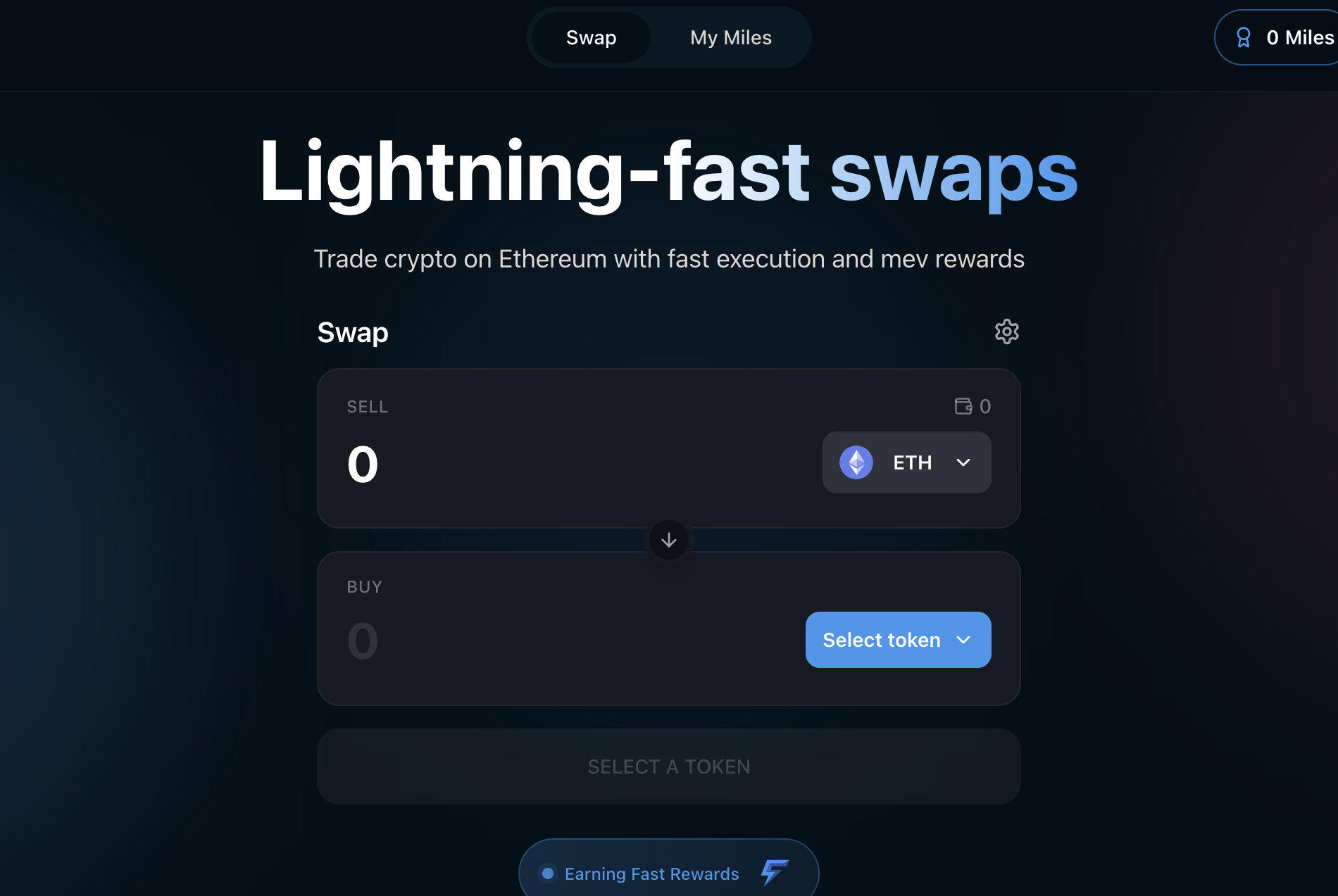
You will see the Fast Swaps landing page with the swap interface.
 Click the **Connect Wallet** button in the top-right corner of the page.
A wallet selection modal will appear. Choose your wallet provider:
* **MetaMask**
* **Rabby**
* **WalletConnect** (for mobile wallets or other providers)
Your wallet extension will prompt you to approve the connection. Confirm the connection in your wallet.
Make sure your wallet is set to **Ethereum Mainnet**. For the best experience, set your Ethereum RPC to [FAST RPC](/v1.2.x/get-started/fastrpc) (`https://fastrpc.mev-commit.xyz`). This enables preconfirmations and mev rewards on all your Ethereum transactions — not just Fast Swaps. See the [FAST RPC setup guide](/v1.2.x/get-started/fastrpc#usage-for-wallets) for instructions.
The swap interface has two sections: **Sell** (top) and **Buy** (bottom).
Click the token selector dropdown in the **Sell** section. By default, it shows ETH.
A token selector modal opens where you can:
* **Search** by token name, symbol, or contract address
* **Browse popular tokens** in the quick-select bar (ETH, DAI, USDT, WBTC)
* **Add a custom token** by pasting any ERC-20 contract address
Select the token you want to sell. For this guide, we will use **ETH**.
Click the **Connect Wallet** button in the top-right corner of the page.
A wallet selection modal will appear. Choose your wallet provider:
* **MetaMask**
* **Rabby**
* **WalletConnect** (for mobile wallets or other providers)
Your wallet extension will prompt you to approve the connection. Confirm the connection in your wallet.
Make sure your wallet is set to **Ethereum Mainnet**. For the best experience, set your Ethereum RPC to [FAST RPC](/v1.2.x/get-started/fastrpc) (`https://fastrpc.mev-commit.xyz`). This enables preconfirmations and mev rewards on all your Ethereum transactions — not just Fast Swaps. See the [FAST RPC setup guide](/v1.2.x/get-started/fastrpc#usage-for-wallets) for instructions.
The swap interface has two sections: **Sell** (top) and **Buy** (bottom).
Click the token selector dropdown in the **Sell** section. By default, it shows ETH.
A token selector modal opens where you can:
* **Search** by token name, symbol, or contract address
* **Browse popular tokens** in the quick-select bar (ETH, DAI, USDT, WBTC)
* **Add a custom token** by pasting any ERC-20 contract address
Select the token you want to sell. For this guide, we will use **ETH**.
 Click the token selector button in the **Buy** section and choose your desired output token. For this guide, we will select **USDC**.
You can click the **switch button** (↕) between the Sell and Buy sections to reverse the swap direction at any time.
Click the amount field in the **Sell** section and type the amount you want to swap. For example, enter `0.1` to swap 0.1 ETH.
As you type, Fast Swaps automatically:
* **Fetches a real-time quote** via a competitive solver auction
* **Displays the output amount** in the Buy section (with USD equivalent)
* **Shows the exchange rate** between the two tokens
* **Shows price impact** — the effect your trade has on the market price
The quote refreshes every **15 seconds**. A countdown timer next to the exchange rate shows when the next refresh will occur.
Click the token selector button in the **Buy** section and choose your desired output token. For this guide, we will select **USDC**.
You can click the **switch button** (↕) between the Sell and Buy sections to reverse the swap direction at any time.
Click the amount field in the **Sell** section and type the amount you want to swap. For example, enter `0.1` to swap 0.1 ETH.
As you type, Fast Swaps automatically:
* **Fetches a real-time quote** via a competitive solver auction
* **Displays the output amount** in the Buy section (with USD equivalent)
* **Shows the exchange rate** between the two tokens
* **Shows price impact** — the effect your trade has on the market price
The quote refreshes every **15 seconds**. A countdown timer next to the exchange rate shows when the next refresh will occur.
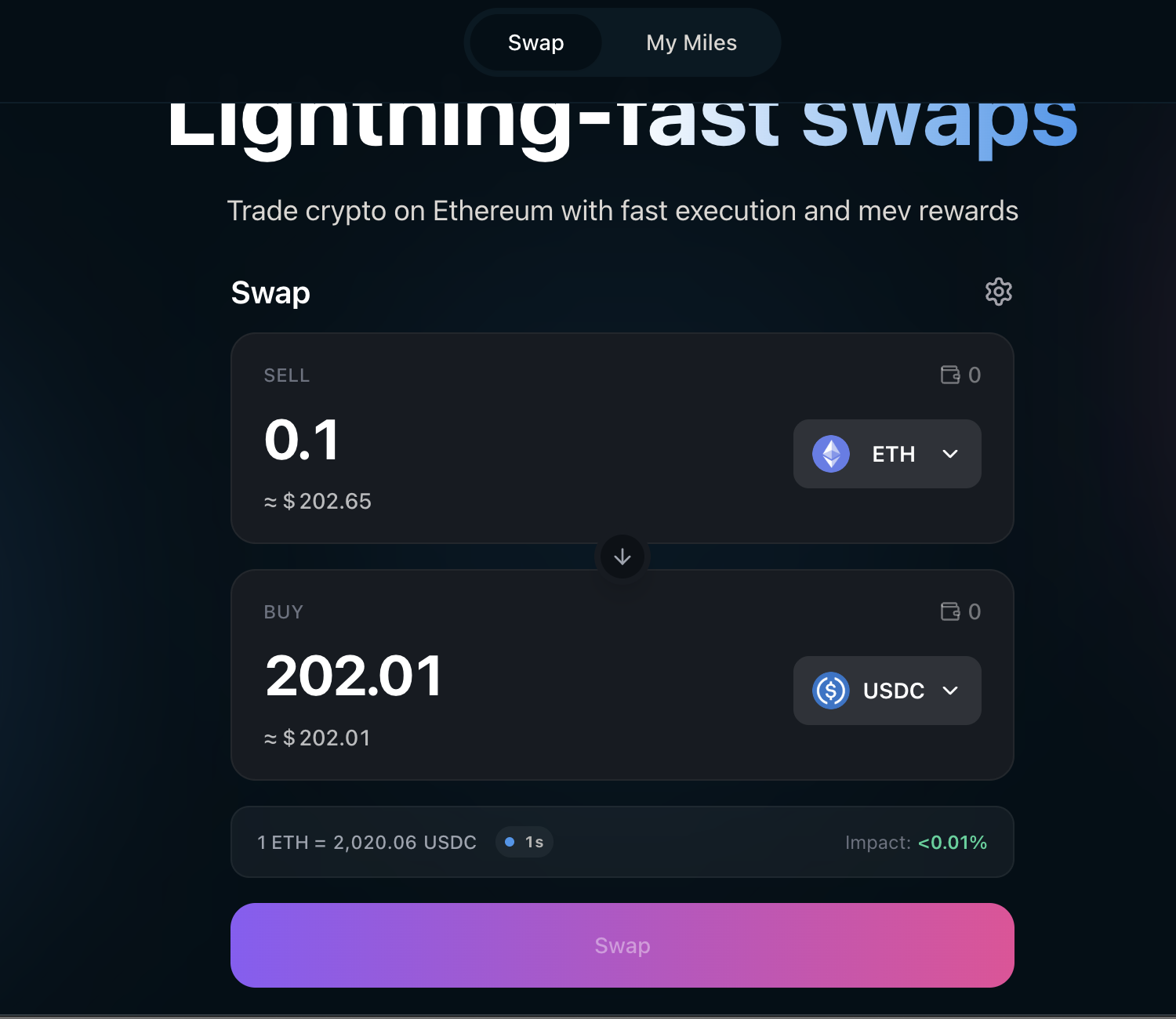 Before confirming, review the swap details displayed below the Buy section:
| Detail | What It Means |
| ----------------- | ------------------------------------------------------------------------------------------------------------------------------------ |
| **Exchange Rate** | How much of the output token you get per unit of input token, with a countdown timer showing when the quote refreshes |
| **Price Impact** | How much your swap moves the market price — green is negligible, yellow is moderate, red means you may want to reduce your swap size |
### Adjust Settings (Optional)
Click the **gear icon** (⚙) next to the Swap heading to open settings. Here you can adjust:
* **Max slippage** — The maximum price movement you are willing to accept (default: 0.5%). You can set a custom percentage.
* **Swap deadline** — How long (in minutes) the swap remains valid before it expires (default: 30 minutes).
Before confirming, review the swap details displayed below the Buy section:
| Detail | What It Means |
| ----------------- | ------------------------------------------------------------------------------------------------------------------------------------ |
| **Exchange Rate** | How much of the output token you get per unit of input token, with a countdown timer showing when the quote refreshes |
| **Price Impact** | How much your swap moves the market price — green is negligible, yellow is moderate, red means you may want to reduce your swap size |
### Adjust Settings (Optional)
Click the **gear icon** (⚙) next to the Swap heading to open settings. Here you can adjust:
* **Max slippage** — The maximum price movement you are willing to accept (default: 0.5%). You can set a custom percentage.
* **Swap deadline** — How long (in minutes) the swap remains valid before it expires (default: 30 minutes).
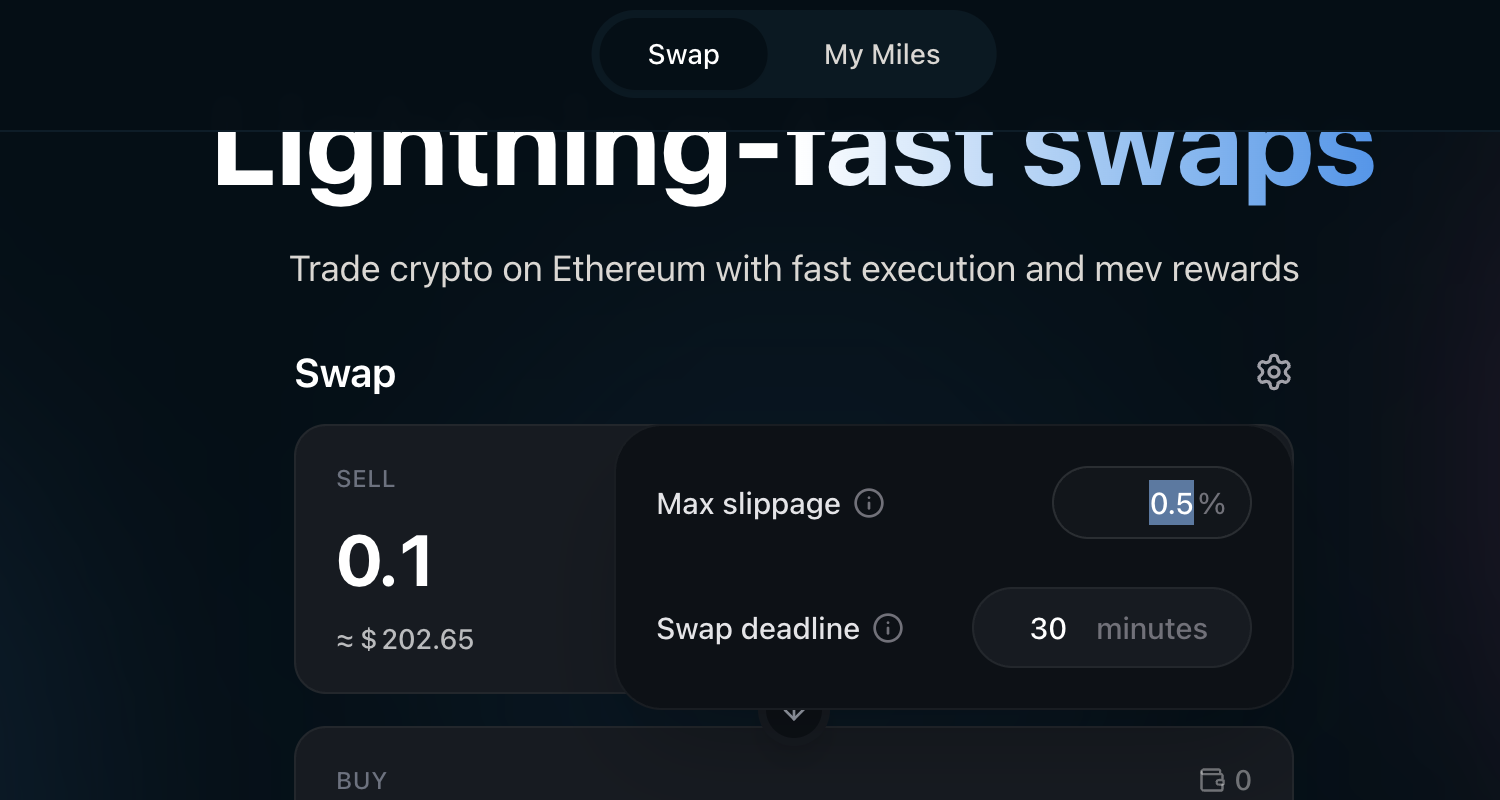 Setting slippage too low may cause the swap to fail if the price moves. Setting it too high may result in a worse exchange rate.
**This step only applies to ERC-20 token swaps** (e.g., USDC → ETH). If you are swapping **ETH as the input token**, skip to the next step.
If this is your first time swapping a particular ERC-20 token on Fast Swaps, you need to approve the **Permit2** contract to access that token. This is a one-time on-chain transaction per token.
Click the **Approve** button. Your wallet will prompt you to confirm the approval transaction.
If you have previously approved this token for Permit2 on another app (like Uniswap), you will not need to approve it again.
Once the approval transaction confirms, the button changes to **Swap**.
Click the **Swap** button to initiate the swap.
A confirmation modal appears showing the full details of your swap, including input and output amounts, the exchange rate, price impact, minimum received after slippage, and estimated gas cost.
Review the details and click **Confirm Swap**.
Your wallet will prompt you to sign the transaction:
* **For ERC-20 input tokens**: You will sign an **EIP-712 message** (a signature, not a transaction). This is gasless — you do not pay gas at this step.
* **For ETH input**: You will sign and submit an **on-chain transaction**. This requires gas.
Confirm the signature or transaction in your wallet.
Within seconds of signing, your swap is **preconfirmed**. A confirmation toast appears at the bottom of the screen.
**Preconfirmed** means Ethereum block builders on the [mev-commit](/v1.2.x/concepts/mev-commit-intro/what-is-mev-commit) network have committed to including your swap in an upcoming block. This gives you near-instant confidence that your swap will settle — no need to wait for the full block to be produced.
This is the core Fast Swaps experience: your swap feels **instant**.
After the preconfirmation, your swap progresses to full on-chain confirmation in the background. The toast will update once the swap is included in a finalized Ethereum block. You do not need to wait for this — the preconfirmation is your signal that the swap is done.
| Status | What It Means |
| ---------------- | ------------------------------------------------------------------------------------------------------------------ |
| **Pending** | Your swap intent has been submitted to FAST RPC |
| **Preconfirmed** | Ethereum block builders on mev-commit have committed to including your transaction — your swap is effectively done |
| **Confirmed** | The swap has been included in a finalized Ethereum block. Your output tokens are fully settled on-chain |
Once fully confirmed on-chain, the toast updates with a link to the transaction on Etherscan.
Your output tokens are now in your wallet. The swap form resets, ready for your next trade.
You will see an **Earning Fast Rewards** indicator below the swap card — this confirms you are accumulating Fast Miles. Check your miles balance from the **My Miles** tab in the top navigation.
***
## Earn Fast Miles
Every swap you make on Fast Swaps earns **Fast Miles** — mev rewards proportional to the value your swaps generate through [Fast Protocol](/v1.2.x/concepts/fast-protocol). The more you swap, the more miles you earn. Users receive at least **90%** of the mev their transactions generate.
Click **My Miles** in the top navigation bar to view your miles balance and swap history.
Check your Fast Miles balance, swap history, and leaderboard position.
See how you rank against other Fast Swaps users.
***
## Tips & Troubleshooting
Ethereum block times are approximately 12 seconds. Most swaps are preconfirmed within seconds and fully confirmed within 1-2 blocks (12-24 seconds). If a swap takes longer:
* Check your wallet for any pending transactions
* The swap may be waiting for a mev-commit opted-in proposer — see [FAST RPC](/v1.2.x/get-started/fastrpc) for details
* If the swap times out (exceeds your deadline), it will automatically cancel and your tokens will remain in your wallet
Common reasons for swap failure:
* **Slippage exceeded** — The price moved more than your max slippage setting between quote and execution. Try increasing slippage via the gear icon (⚙).
* **Insufficient balance** — Make sure you have enough of the input token plus ETH for gas (if swapping ETH).
* **Deadline expired** — The swap was not executed before the swap deadline. Try again with a fresh quote.
* **Price impact too high** — For large swaps, try splitting into smaller amounts.
The Permit2 approval may still be confirming on-chain. Wait for the approval transaction to be mined (check your wallet's activity tab), then refresh the page.
Fast Swaps supports any ERC-20 token with on-chain liquidity on Ethereum. If a token does not appear in the default list, you can add it by pasting its contract address in the token selector search bar. Always verify the contract address from a trusted source like [Etherscan](https://etherscan.io) or [CoinGecko](https://coingecko.com).
* **Swapping ERC-20 tokens** (e.g., USDC → ETH): After the initial one-time Permit2 approval, subsequent swaps are **gasless** — you only sign a message.
* **Swapping ETH** (e.g., ETH → USDC): You submit an on-chain transaction and pay standard Ethereum gas fees.
* **First-time token approval**: The one-time Permit2 approval requires a small amount of ETH for gas.
***
## What's Next?
Learn about the technical architecture, smart contracts, and mev reward mechanics behind Fast Swaps.
Understand how mev is captured, distributed, and why users receive at least 90% of the mev their transactions generate.
Learn about the FAST RPC that powers preconfirmations and mev capture for Fast Swaps.
Quick FAQ on Fast Swaps fundamentals.
Setting slippage too low may cause the swap to fail if the price moves. Setting it too high may result in a worse exchange rate.
**This step only applies to ERC-20 token swaps** (e.g., USDC → ETH). If you are swapping **ETH as the input token**, skip to the next step.
If this is your first time swapping a particular ERC-20 token on Fast Swaps, you need to approve the **Permit2** contract to access that token. This is a one-time on-chain transaction per token.
Click the **Approve** button. Your wallet will prompt you to confirm the approval transaction.
If you have previously approved this token for Permit2 on another app (like Uniswap), you will not need to approve it again.
Once the approval transaction confirms, the button changes to **Swap**.
Click the **Swap** button to initiate the swap.
A confirmation modal appears showing the full details of your swap, including input and output amounts, the exchange rate, price impact, minimum received after slippage, and estimated gas cost.
Review the details and click **Confirm Swap**.
Your wallet will prompt you to sign the transaction:
* **For ERC-20 input tokens**: You will sign an **EIP-712 message** (a signature, not a transaction). This is gasless — you do not pay gas at this step.
* **For ETH input**: You will sign and submit an **on-chain transaction**. This requires gas.
Confirm the signature or transaction in your wallet.
Within seconds of signing, your swap is **preconfirmed**. A confirmation toast appears at the bottom of the screen.
**Preconfirmed** means Ethereum block builders on the [mev-commit](/v1.2.x/concepts/mev-commit-intro/what-is-mev-commit) network have committed to including your swap in an upcoming block. This gives you near-instant confidence that your swap will settle — no need to wait for the full block to be produced.
This is the core Fast Swaps experience: your swap feels **instant**.
After the preconfirmation, your swap progresses to full on-chain confirmation in the background. The toast will update once the swap is included in a finalized Ethereum block. You do not need to wait for this — the preconfirmation is your signal that the swap is done.
| Status | What It Means |
| ---------------- | ------------------------------------------------------------------------------------------------------------------ |
| **Pending** | Your swap intent has been submitted to FAST RPC |
| **Preconfirmed** | Ethereum block builders on mev-commit have committed to including your transaction — your swap is effectively done |
| **Confirmed** | The swap has been included in a finalized Ethereum block. Your output tokens are fully settled on-chain |
Once fully confirmed on-chain, the toast updates with a link to the transaction on Etherscan.
Your output tokens are now in your wallet. The swap form resets, ready for your next trade.
You will see an **Earning Fast Rewards** indicator below the swap card — this confirms you are accumulating Fast Miles. Check your miles balance from the **My Miles** tab in the top navigation.
***
## Earn Fast Miles
Every swap you make on Fast Swaps earns **Fast Miles** — mev rewards proportional to the value your swaps generate through [Fast Protocol](/v1.2.x/concepts/fast-protocol). The more you swap, the more miles you earn. Users receive at least **90%** of the mev their transactions generate.
Click **My Miles** in the top navigation bar to view your miles balance and swap history.
Check your Fast Miles balance, swap history, and leaderboard position.
See how you rank against other Fast Swaps users.
***
## Tips & Troubleshooting
Ethereum block times are approximately 12 seconds. Most swaps are preconfirmed within seconds and fully confirmed within 1-2 blocks (12-24 seconds). If a swap takes longer:
* Check your wallet for any pending transactions
* The swap may be waiting for a mev-commit opted-in proposer — see [FAST RPC](/v1.2.x/get-started/fastrpc) for details
* If the swap times out (exceeds your deadline), it will automatically cancel and your tokens will remain in your wallet
Common reasons for swap failure:
* **Slippage exceeded** — The price moved more than your max slippage setting between quote and execution. Try increasing slippage via the gear icon (⚙).
* **Insufficient balance** — Make sure you have enough of the input token plus ETH for gas (if swapping ETH).
* **Deadline expired** — The swap was not executed before the swap deadline. Try again with a fresh quote.
* **Price impact too high** — For large swaps, try splitting into smaller amounts.
The Permit2 approval may still be confirming on-chain. Wait for the approval transaction to be mined (check your wallet's activity tab), then refresh the page.
Fast Swaps supports any ERC-20 token with on-chain liquidity on Ethereum. If a token does not appear in the default list, you can add it by pasting its contract address in the token selector search bar. Always verify the contract address from a trusted source like [Etherscan](https://etherscan.io) or [CoinGecko](https://coingecko.com).
* **Swapping ERC-20 tokens** (e.g., USDC → ETH): After the initial one-time Permit2 approval, subsequent swaps are **gasless** — you only sign a message.
* **Swapping ETH** (e.g., ETH → USDC): You submit an on-chain transaction and pay standard Ethereum gas fees.
* **First-time token approval**: The one-time Permit2 approval requires a small amount of ETH for gas.
***
## What's Next?
Learn about the technical architecture, smart contracts, and mev reward mechanics behind Fast Swaps.
Understand how mev is captured, distributed, and why users receive at least 90% of the mev their transactions generate.
Learn about the FAST RPC that powers preconfirmations and mev capture for Fast Swaps.
Quick FAQ on Fast Swaps fundamentals.